CLAUDE.md is the file Claude Code reads before it touches your project: coding standards, architecture notes, the commands you would otherwise repeat in every prompt. It is Markdown, it grows to hundreds of lines, and most people maintain it in the same plain-text pane they use for source code. PenPage gives it a real editor — visual Markdown, editable tables, and a direct link to the actual file on disk.
When Claude Code starts working in a repository, it reads CLAUDE.md from the
project root and treats it as standing context for the whole session. Anything in that file
applies to every request you make, so it is where project knowledge goes to stop being
re-typed: the stack, the commands, the conventions, the traps someone already fell into.
The file is plain Markdown — headings, tables, fenced code blocks, links. Claude Code also
picks up CLAUDE.md files placed in subdirectories, which apply to work inside
those directories, and a personal one at ~/.claude/CLAUDE.md that follows you
across every project on that machine. The same editing problem applies to
AGENTS.md and the other agent instruction files that have converged on the
same shape.
A CLAUDE.md that is actually pulling its weight usually contains:
A one-paragraph project overview, so the agent does not have to infer intent from file names.
A tech stack table — framework, build tool, test runner, deployment target.
Common commands, verbatim and copy-pasteable.
Code standards: indentation, quotes, comment language, line length.
Architecture notes and known traps — the expensive knowledge that is not in the code.
Why editing it in a code pane gets old
Tables are the best part and the worst part
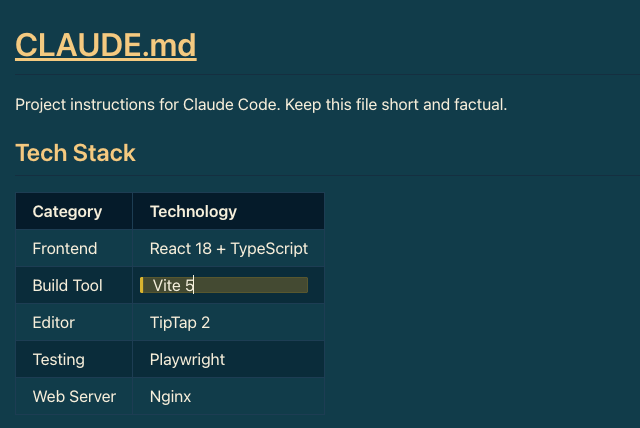
Stack tables and file maps are the highest-value rows in a CLAUDE.md and the most miserable
Markdown to maintain by hand. Adding one column means re-aligning every pipe, and a
misaligned table silently stops being a table. In PenPage you edit cells directly, tab
between them, insert rows, and the file is written back as clean pipe-table Markdown.
The same tech stack table, edited as a table. PenPage writes it back to the file as standard pipe-table Markdown.
It is a document, not source code
A 300-line CLAUDE.md read in a monospace column all looks equally important. Read the same
file with real heading hierarchy, proportional text and rendered tables and the problems
surface immediately: two sections saying contradictory things, a command that has not been
true since the Docker migration, four bullets that should be one.
It lives on more than one machine
If you run Claude Code on a laptop and a desktop, your personal
~/.claude/CLAUDE.md is not in any repository and gets out of sync quietly.
PenPage's optional Google Drive sync keeps one copy current on both, using your own Drive —
nothing passes through our servers.
Link it to the real file, not a copy
Copy-paste round trips are how instruction files rot. PenPage can link a folder on your
computer: you grant access to a directory once, and every .md file in it and
its subdirectories becomes editable in place. Save in PenPage and the bytes land in the
actual file — no export step, no second copy to reconcile.
Push writes your edits back to the file on disk.
Pull picks up changes made outside PenPage, such as a teammate's commit you just merged.
Sync detects the direction automatically when only one side has moved.
Folder linking uses the File System Access API, which today means a Chromium-based desktop
browser — Chrome, Edge, Brave or Arc. On Safari, Firefox or mobile, import and export
Markdown files instead, or keep the file in sync through Google Drive.
Three ways people actually use this
1. One instruction file, two machines
Keep your global ~/.claude/CLAUDE.md in a PenPage folder with Drive sync on.
Edit it on either machine, and the other one has it next time you open PenPage. Link the
folder on each machine and the file on disk stays current too.
2. Refactoring a CLAUDE.md that has grown
Files that started at 40 lines reach 400 by accretion. Pull the file into PenPage, read it
as a document, cut the sections that duplicate what the code already says, and push the
result back in one edit — with the repo copy in git, so the diff is reviewable.
3. Drafting before it reaches the repo
For a shared project, the CLAUDE.md is a team artifact and deserves the same care as a
README. Draft it locally, get the tables and command blocks right, then paste one clean
version into the pull request instead of six commits of formatting fixes.
How it compares
Your IDE
GitHub web editor
A notes app
PenPage
Formatted while you type
Split preview
No
Yes
Yes
Tables without aligning pipes
No
No
Yes
Yes
Writes back to the real file
Yes
Commits directly
No — copy & paste
Yes, on Chromium desktop
Works offline
Yes
No
Partly
Yes, installable PWA
Across your own machines
Via git
Via git
Their servers
Your Google Drive, or git
Content stored on a vendor server
No
Your repo
Yes
No, local by default
Account required
No
Yes
Yes
No
None of this makes the other tools wrong. Fixing one line mid-session is faster in the
editor you already have open, and for anything a team shares, git stays the source of
truth. PenPage earns its place when the file is long, table-heavy, or you maintain it on
more than one machine.
Getting started
Open PenPage. There is no sign-up step — the editor is there immediately.
On a Chromium desktop browser, link the folder that holds your CLAUDE.md. Otherwise import the file.
Edit it as a document. Tables, checklists and code blocks all behave like you expect.
Push the change back to disk, and commit it the way you would any other file.
Frequently asked questions
Will PenPage rewrite my CLAUDE.md formatting?
It writes standard Markdown — ATX headings, pipe tables, fenced code blocks. Your content and section order are preserved, but whitespace and table padding are normalized, so the first save can produce a cosmetic diff. Keep the file in git and review that diff once; subsequent saves are stable.
Can I edit files other than CLAUDE.md?
Yes. Linking a folder picks up every Markdown file in it and its subdirectories, so AGENTS.md, README.md, docs pages and skill definitions are all editable the same way.
Does my project code get uploaded anywhere?
No. PenPage stores notes locally in your browser using IndexedDB, and only the Markdown files you actually open are read. Google Drive sync is optional and writes to your own Drive account.
Which browsers can link to a local folder?
Chromium-based desktop browsers — Chrome, Edge, Brave, Arc — because the feature uses the File System Access API. On Safari, Firefox and mobile you can still import and export Markdown, or sync through Google Drive.
Does it work offline?
Yes. PenPage installs as a PWA and the editor works with no network connection. Folder linking is local anyway, so editing a CLAUDE.md offline works exactly as it does online.
Is there a paid tier?
No. The editor, local storage, folder linking and Drive sync are all free, and no account is required to start.
Start writing
No account, no trial, nothing to install. Open the editor and your first CLAUDE.md is one paste away.